Dashboard User Guide: Dashboard GUI
This page is the view-by-view reference for the Logster dashboard. Each section explains what the view shows, where the numbers come from, and how to read them during an investigation.
Summary
Served by GET /summary.
The top of the dashboard is a row of KPI tiles pulled from the
logster-inferences index over the selected time range. The
underlying Elasticsearch aggregation is straightforward — one
filter, avg, max, or cardinality metric per tile.
| Tile | What it means |
|---|---|
| Total inferences | How many GNN runs completed in the time range. |
| Total attacks | Of those, how many came back with prediction == "attack". |
| Total benign | The benign count. total = attacks + benign + errors. |
| Avg attack probability | Average attack_prob across every inference. |
| Max attack probability | Peak attack_prob. Rising max is the strongest early signal of a live attack. |
| Avg confidence | Model confidence. Low confidence with moderate attack_prob usually means noisy input rather than a real attack. |
| Avg inference time (ms) | Health signal. A sudden jump means inference is under load. |
| Hosts | Unique endpoints that produced at least one inference in the window. |
| Avg graph nodes / edges | Size of the graphs the GNN is running on. Very small graphs (< 3 nodes) are usually why error predictions happen. |
How to read it
- If total attacks > 0 in a
now-30mwindow, that's what you investigate next. Jump to Hosts or Recent Attacks. - If max attack probability is near 1.0 but total attacks is zero, the threshold is too high for that run — rare, but check Admin Guide: Installation Parameters.
- If avg inference time is spiking while hosts is stable, the
fleet is getting noisier per host — tune
inference.window/inference.interval.

Summary KPI row — six tiles over the selected time range. "Attacks Detected" and "Max Attack Probability" are the two tiles analysts read first.
Hosts
Served by GET /hosts.
A card per endpoint. Each card shows:
- Hostname
- Total inferences in the time range
- Attack count — how many inferences came back as attack
- Average / maximum attack probability
- Latest activity timestamp
How to read it
Sort mentally by max attack probability first, then by attack
count. A host with max_prob = 0.97 and attack_count = 2 is
almost always a better first stop than one with max_prob = 0.75
and attack_count = 40.
Cards are color-coded by severity on the UI side. The color mapping follows the same thresholds as the alerts service:
| Color / label | max_prob |
|---|---|
| CRITICAL | >= 0.95 |
| HIGH | >= 0.85 |
| MEDIUM | >= 0.70 |
| LOW | < 0.70 |
Clicking a card sets the hostname filter for every other tile in the dashboard.
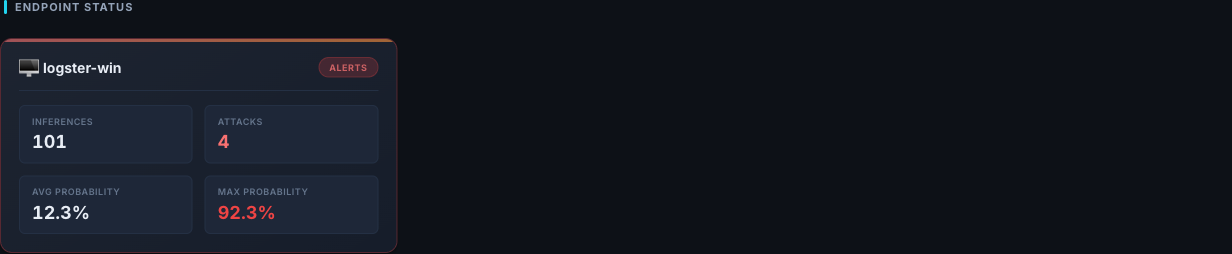
Endpoint Status — one card per host. Header banner turns to "Alerts" when attacks are detected; the four tiles (Inferences, Attacks, Avg / Max Probability) let you sort mentally by worst-first.
Attack Timeline
Served by GET /timeline.
A bucketed date histogram over inferences. Each bucket carries four metrics:
attack_count— inferences withprediction == "attack"benign_countavg_attack_probabilitymax_attack_probability
How to read it
- A flat benign line punctuated by a single attack spike = isolated suspicious window. Investigate that one bucket.
- A rising
avg_attack_probabilityover several consecutive buckets = a multi-step attack whose graphs are getting more incriminating. This is the "live incident" pattern. - A big
maxbut a lowavg= one loud window inside a quiet hour. Likely a short burst — PowerShell, lateral login, a scheduled task firing.
The timeline respects both the time range and the hostname filter, so you can scope it to a single host and see its activity at 1-minute resolution.
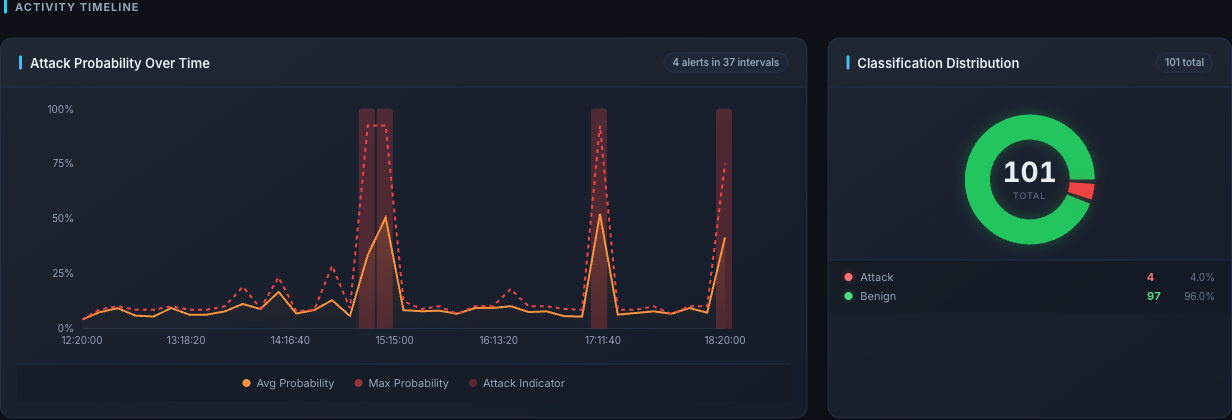
Activity Timeline — avg / max attack probability line plus the red "attack indicator" bars at each spike. The right panel shows attack vs benign split for the same time range.
Recent Attacks
Served by GET /attacks/recent.
A sorted list of the most recent inferences where
prediction == "attack", newest first, inside the current time range.
Each row contains the full inference document: inference_id,
endpoint_id, attack_prob, confidence, ttp_techniques,
event_ids, and graph stats.
Rows are the entry point for the Inference Detail view — clicking one opens the drill-down.
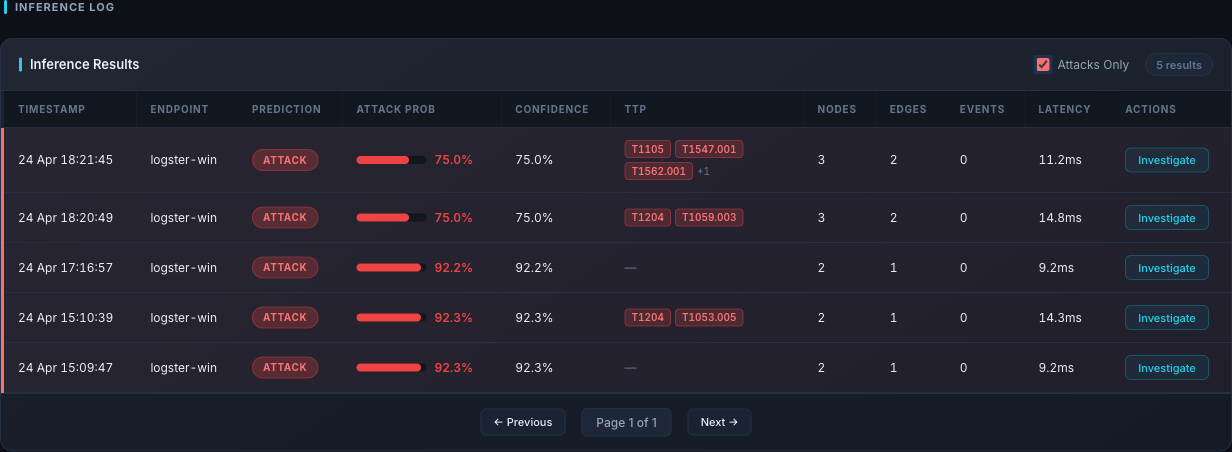
Inference Log with "Attacks Only" checked — this is the "Recent Attacks" view. Each row carries the TTP chips and the Investigate button that opens the Inference Detail modal.
Inference Detail
Served by GET /inference/:inference_id.
The single most important investigation view. Given an inference_id,
it returns:
- The full inference record — prediction, attack probability, confidence, threshold, window start/end, graph sizes, model name, TTP techniques.
- Every normalized event that contributed to that window, sorted
by timestamp. For each event:
event_type,image,command_line,parent_image,parent_command_line,user,hashes, and (for file events)target_filename.
How to read it
This is where you answer the question: "What is the model actually looking at that makes it think this is an attack?"
- Start with the window time range. That's the 3-minute slice (by default) the GNN used.
- Scan the event list top-to-bottom and look for one of the classic
shapes:
powershell.exewith an-enc/ base64 argumentwmic/schtasks/at.exespawning under an unusual parent- LOLBins spawned by
winword.exe,excel.exe,outlook.exe whoami/net user/net groupright after a user logon- File writes into
C:\Users\Public\,%TEMP%\, or system dirs
- Match what you see against the
ttp_techniquesfield — it's the short-form story of what Logster thinks happened.
[!NOTE] If the event list is empty or very small (
num_nodes <= 2), the GNN ran on a nearly-empty window. Those are the inferences that usually come back aserrorrather than useful verdicts — ignore them for triage and investigate ingestion gaps instead.
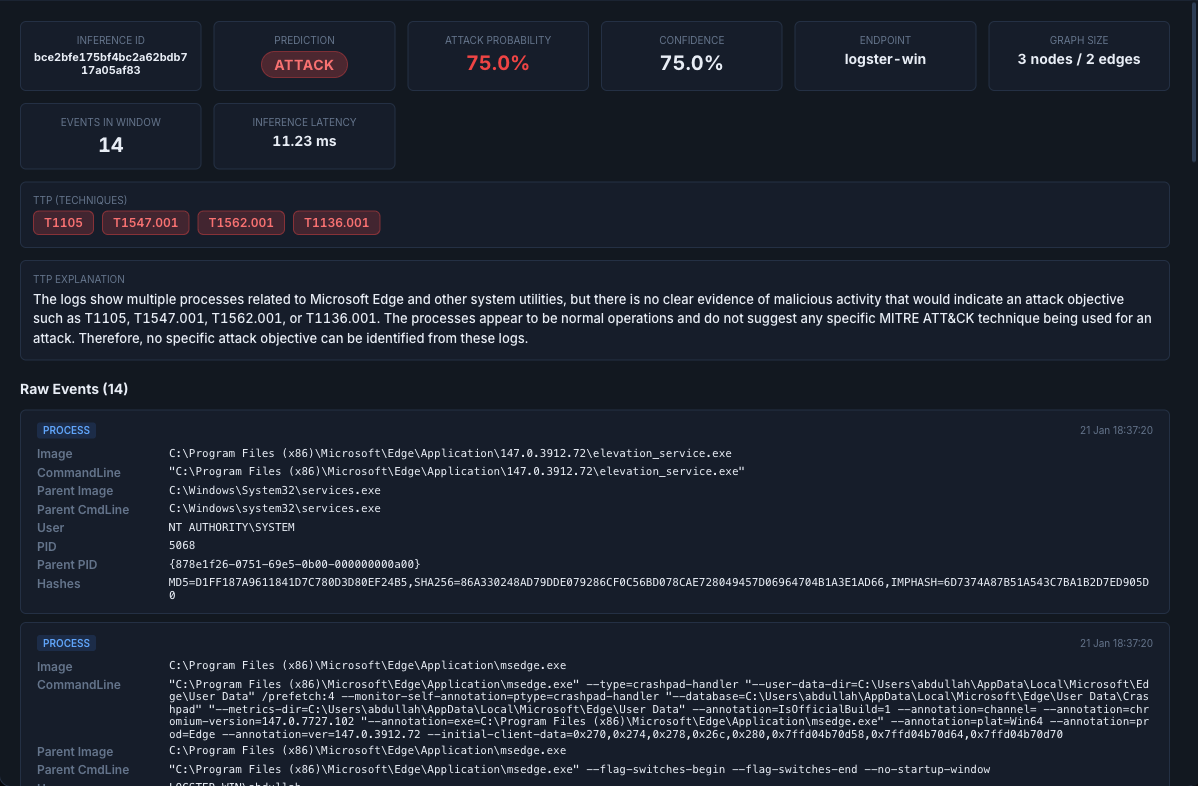
Inference Investigation modal — metadata tiles across the top, the MITRE TTP chips, a natural-language TTP explanation, and the scrollable Raw Events list below.
Process Tree
Served by GET /process-tree/:inference_id.
Takes the same inference_id and reconstructs a flat process timeline
from every contributing event: pid, ppid, image, command_line,
parent_image, user, and timestamp. The UI renders it as a tree
anchored on parent/child relationships.
How to read it
Walk the tree from the root down. Most real attacks show one of two patterns:
- LOLBin chain:
explorer.exe → cmd.exe → powershell.exe -enc ...orwinword.exe → cmd.exe → mshta.exe. - Service abuse:
services.exe → svchost.exe → <something unexpected>.
If the parent of a suspicious process is itself suspicious, keep
walking up. If the parent is explorer.exe or services.exe, you
have probably found the initial execution.
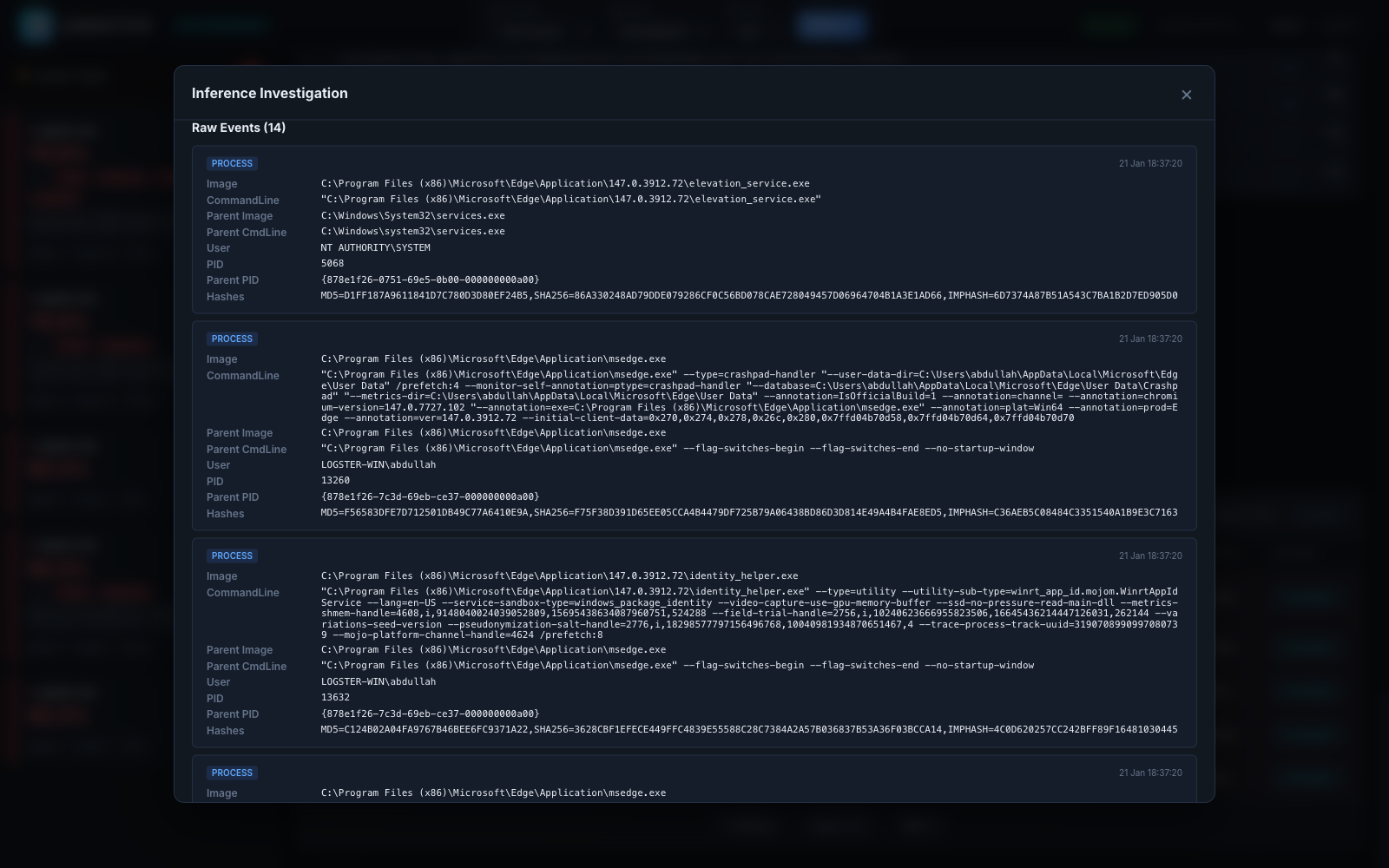
Raw Events inside the modal — each process card carries Image / Parent Image / Parent CmdLine / PID / Parent PID. Walk parent→child by matching Parent PID to PID of an earlier card. The current dashboard renders the parent/child chain inline in this list rather than as a separate tree graph; the aggregate parent→child bars also appear in the Endpoint Insights "Process Relationships" panel below.
Endpoint Insights
Served by the /insights/* endpoints, with a Linux-specific runtime
mapping layer that normalizes auditd / eBPF fields behind the scenes.
A set of panels computed from the events index rather than inferences, so they describe raw host behavior regardless of model opinion. Use them to build a baseline.
| Panel | Endpoint | What it answers |
|---|---|---|
| Event volume over time | /insights/event-volume |
How noisy is this host right now? |
| User activity | /insights/user-activity |
Who is actually doing things on this host? |
| Privilege levels | /insights/privilege-levels |
What privilege is each action running with? |
| File activity | /insights/file-activity |
Which files are being touched most? |
| Network destinations | /insights/network-destinations |
Where is this host talking to? |
| Process relationships | /insights/process-relationships |
What spawns what on this host? |
| Command lines | /insights/command-lines |
Top command-line strings seen recently. |
All insight panels accept a platform query parameter (windows,
linux, or all). The Linux branch uses Painless runtime mappings
to fish fields out of raw auditd/eBPF records — you don't have to
think about this as an analyst; the same panel works across both
platforms.
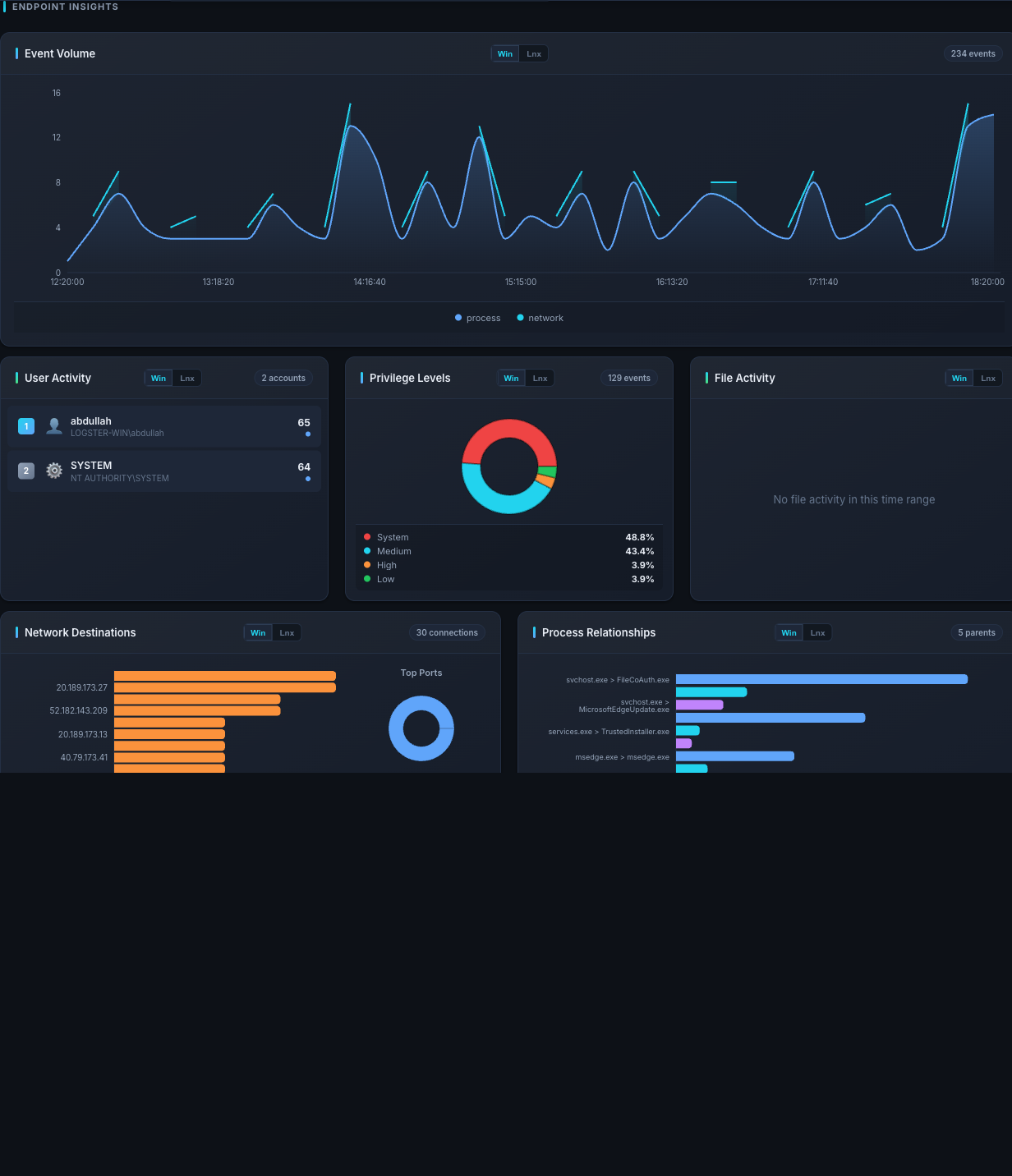
Endpoint Insights — Event Volume across the time range, then per-host baselines: who's active (User Activity), at what privilege (Privilege Levels), file / network destinations, and the parent→child process chains.
Distribution — where is the noise coming from?
Served by GET /distribution.
Three aggregations that answer different questions:
predictions— how manyattack,benign, anderrorverdicts in the time range. A higherrorcount means the inference service is feeding the GNN bad or undersized windows.host_attacks— per-hosttotalvsattacks. Lets you see which host is the biggest attack-generator.probability_distribution— a histogram ofattack_probin0.1buckets. Shows you the overall skew of the fleet. A healthy fleet is heavily skewed toward the0.0–0.1bucket with a small tail above0.7.
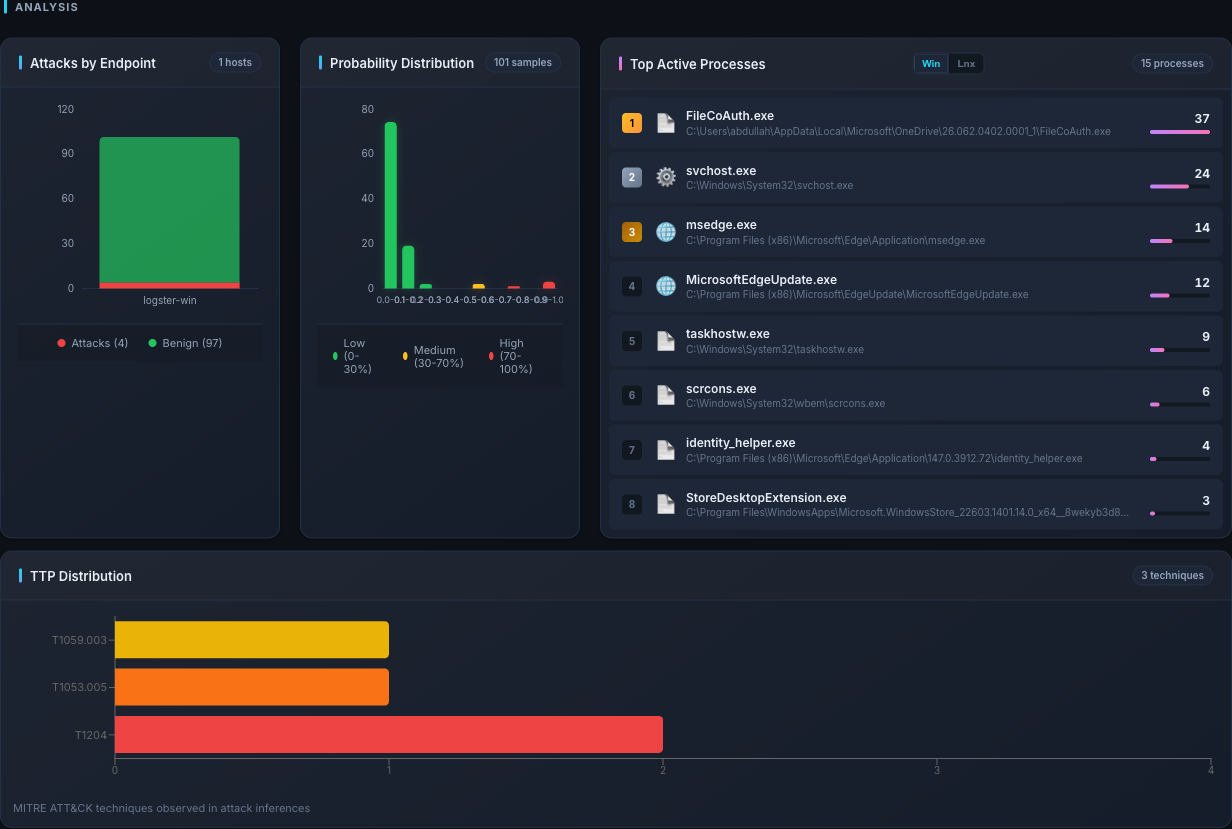
Analysis — Attacks by Endpoint shows the per-host attack / benign split; Probability Distribution is the 0.1-bucket histogram of attack_prob (healthy fleets skew hard to 0.0–0.1 with a small tail above 0.7); Top Active Processes and TTP Distribution round out the noise picture.
Analytics
Served by the /analytics/* endpoints.
A cluster of deeper views.
| Endpoint | What it answers |
|---|---|
/analytics/trend |
How does the current period compare to the previous period? (up / down / stable based on ±5%.) |
/analytics/event-types |
Event type breakdown (process / file / network / script / syscall). |
/analytics/top-processes |
Most-seen process images and their parents. |
/analytics/endpoint-platforms |
Which endpoints reported Windows vs Linux events. |
/analytics/heatmap |
Day-of-week × hour heatmap for attack inferences. |
/analytics/threat-metrics |
Derived threatScore / threatLevel plus severity buckets and probability percentiles. |
/analytics/ttp-distribution |
Top MITRE ATT&CK techniques across attacks. |
/analytics/attack-timeline |
Bucketed attack history with per-bucket avg / max / high-severity counts. |
The two most valuable tiles during an active investigation are Trend (is the attack rate rising?) and TTP distribution (which techniques dominate right now?).
[!NOTE] The dashboard's threat score is a simple composite —
0.4 * attack_rate + 0.3 * avg_prob + 0.3 * max_prob, clipped to 0–100 and bucketed intolow/medium/high/critical. It is a rule-of-thumb, not a formal model output. Use it as a quick indicator, not as your only signal.
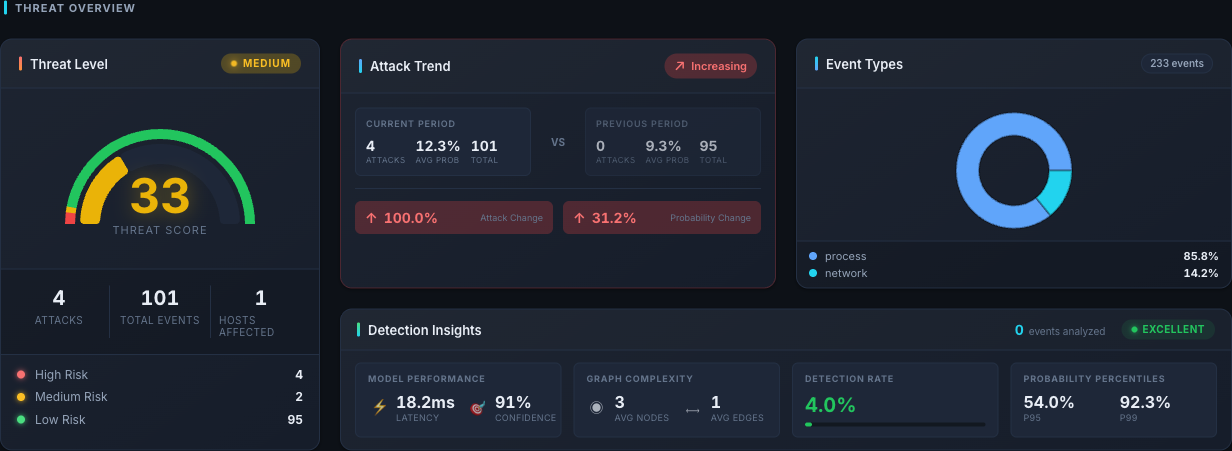
Threat Overview — composite threat score gauge, period-over-period Attack Trend (current vs previous window), Event Types donut, and Detection Insights with model latency, confidence, and P95 / P99 probability percentiles.
Reading MITRE ATT&CK TTPs
TTP IDs show up on inference records, in the alerts stream, and in
the /analytics/ttp-distribution panel. The format is always
Tnnnn[.nnn] — an MITRE ATT&CK technique or sub-technique
identifier.
When an alert carries multiple TTPs, treat them as simultaneous observations: the graph in that window matched all of the listed techniques. Multiple TTPs are stronger evidence than a single one.
The canonical MITRE reference is https://attack.mitre.org. Look up each ID there for the full description, the detections MITRE recommends, and known mitigations.
TBD — site-specific technique glossary. If your deployment consistently surfaces a handful of technique IDs, add a short reference table here pointing analysts at the MITRE page for each. Populate from real
ttp_techniqueshistory, not assumptions about what the model might detect.
When something on the dashboard looks wrong
- All tiles empty, no errors. The time range has no data — widen
it, or check that inferences are reaching Elasticsearch:
curl http://localhost:9200/logster-inferences/_count. errorprediction count is high. The GNN is seeing under-sized windows. See Troubleshooting Guide.- Same attack keeps re-appearing every 30 seconds. The
dashboard shows every inference, not the deduplicated alert. For
a de-duplicated view, query the REST API
/alertsendpoint. - A host disappears. Check the time range and hostname filter — the view may have scoped it out.
For anything else, the two indices are your source of truth:
curl 'http://localhost:9200/logster-events/_search?pretty&size=5'
curl 'http://localhost:9200/logster-inferences/_search?pretty&size=5'
Kibana (http://localhost:5601) is the better tool for free-form Elasticsearch exploration — every dashboard tile is ultimately a Kibana query in disguise.
Next steps
- Investigation Examples — end-to-end triage workflows with worked examples.
- API User Guide — record analyst verdicts via the REST API.