RDAP Dossier
The RDAP Dossier enriches ZoneFeeds search results with live registration data from the Registration Data Access Protocol (RDAP). When you click any domain in the Search Results table, a side panel opens with the registrar of record, lifecycle dates, status codes, abuse contacts, nameservers, and the raw RDAP JSON returned by the authoritative registry server.
This turns a zone-file observation (which only tells you a domain was present in a TLD's zone at a point in time) into a complete intelligence record suitable for incident response, brand protection, and takedown workflows.
Availability: The RDAP Dossier is available on Basic and Enterprise plans. It is not included in the Trial plan.
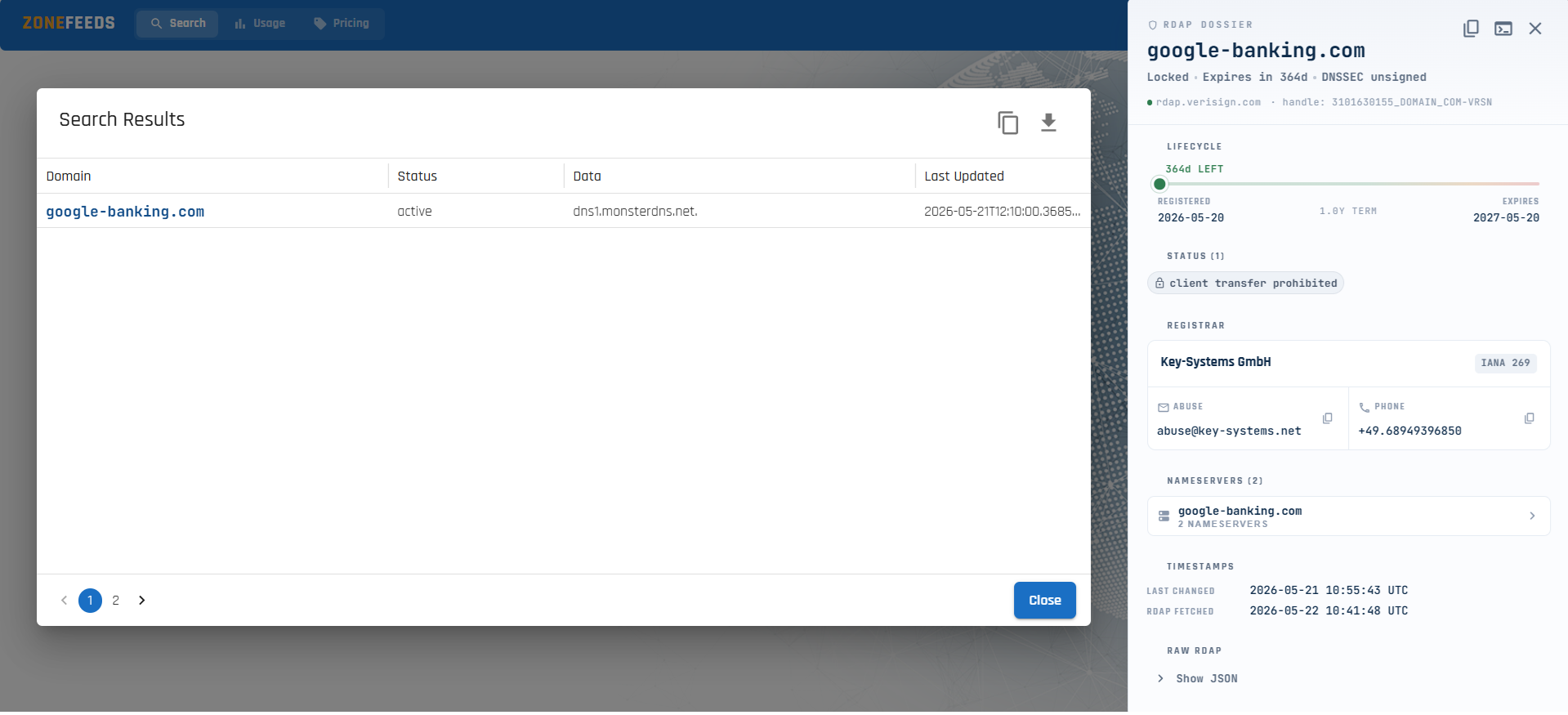
Opening the Dossier
- Run a search from the Search page
- In the Search Results table, click any domain name in the Domain column
- The RDAP Dossier panel opens on the right side of the screen
- Click Close (or the × icon in the panel header) to dismiss it
The dossier fetches live RDAP data on demand from the registry responsible for
the domain's TLD (for example, rdap.verisign.com for .com and .net).
Panel Header
The top of the panel shows the queried domain along with at-a-glance status chips and source metadata.
| Element | Description |
|---|---|
| Domain name | The fully qualified domain name the dossier was opened for |
| Lock chip | Locked indicates the domain has a transfer-prohibited or update-prohibited status |
| Expiry chip | Days remaining until the registration expires (e.g. Expires in 364d) |
| DNSSEC chip | DNSSEC signed or DNSSEC unsigned based on the registry's secureDNS data |
| Source | The RDAP server that returned the data (e.g. rdap.verisign.com) |
| Handle | The registry-assigned object handle for the domain |
| Copy icon | Copies the dossier contents to your clipboard |
| Raw view icon | Toggles the Raw RDAP JSON view at the bottom of the panel |
Lifecycle
The lifecycle section visualises the domain's registration timeline as a bar.
| Field | Description |
|---|---|
<N>d LEFT |
Days remaining until expiration |
| Registered | The registration (creation) date returned by the registry |
| Term | Total registration term in years (e.g. 1.0Y TERM) |
| Expires | The expiration date returned by the registry |
The coloured bar fills from green to red as the domain approaches expiry, making short-lived and soon-to-expire domains visually obvious during triage.
Status
The Status section lists every EPP status code reported by the registry for
the domain (e.g. client transfer prohibited, server hold, pending delete).
These codes describe the operational state of the domain at the registry and registrar level. For full definitions, refer to ICANN's status code reference at https://icann.org/epp.
Common codes you will see in the dossier include:
| Code | Meaning |
|---|---|
client transfer prohibited |
Registrar has locked the domain against transfer |
client update prohibited |
Registrar has locked the domain against updates |
client delete prohibited |
Registrar has locked the domain against deletion |
server hold |
Registry has removed the domain from the DNS zone |
pending delete |
Domain is in the deletion grace period |
redemption period |
Domain has expired and is in the redemption grace period |
Registrar
The Registrar card identifies the company that manages the domain on behalf of the registrant.
| Field | Description |
|---|---|
| Registrar name | The sponsoring registrar (e.g. Key-Systems GmbH) |
| IANA ID | The registrar's IANA-assigned identifier (e.g. IANA 269) |
| Abuse email | The registrar's published abuse contact address |
| Abuse phone | The registrar's published abuse contact phone number |
Both the abuse email and phone are clickable — use them to initiate takedown requests or abuse reports without leaving the dossier.
Nameservers
Lists the authoritative nameservers reported by the registry for the domain.
The count is shown in the section header (e.g. Nameservers (2)).
The nameservers shown here come from the registry (RDAP) and may differ from the DNS records observed in the zone file (shown in the main results table). A mismatch between the two can indicate recent delegation changes or registry-vs- authoritative inconsistencies worth investigating.
Timestamps
| Field | Description |
|---|---|
| Last changed | The registry's last changed event — when the domain record was last modified at the registry |
| RDAP fetched | When ZoneFeeds last retrieved this RDAP record from the registry |
The RDAP fetched timestamp tells you how fresh the dossier data is. If the record is stale, closing and reopening the dossier will refresh it.
Raw RDAP
Clicking the raw-view icon in the panel header (or the Hide / Show JSON toggle at the bottom of the panel) reveals the complete RDAP response as returned by the registry, including:
objectClassName,handle,ldhNamelinks— RDAP self and related linksstatus— full EPP status arrayentities— registrar and abuse vCard dataevents— registration, expiration, last-changed, and last-update eventssecureDNS— DNSSEC delegation signing statusnameservers— registry-reported nameserver objectsnotices— registry terms of service, status code references, and complaint formsrdapConformance— RDAP protocol conformance levels
Use this view when you need the original record verbatim — for example, when attaching evidence to a takedown request, ingesting into a SIEM, or cross-checking fields not surfaced in the structured view.
The JSON block can be copied with the inline copy icon next to the Hide JSON header.
How RDAP Differs from Zone Data
The main Search Results table shows zone-file observations — the DNS records ZoneFeeds saw when ingesting the TLD zone on a given day. The RDAP Dossier shows registration data — what the registry knows about the domain.
| Aspect | Zone Data (table) | RDAP Dossier |
|---|---|---|
| Source | Registry zone file | Registry RDAP server |
| Frequency | Once per zone publication (typically daily) | Fetched on demand when you open the dossier |
| What it tells you | Whether the domain was delegated and its DNS records | Who registered it, when, and the domain's lifecycle state |
| Available for inactive domains | Yes (historical observations) | Only while the registry still publishes an RDAP record |
Used together, they answer both "was this domain live in DNS?" and "who registered it and when?" for the same observation.
Use Cases
- Incident response — pivot from a phishing domain seen in zone data to its registrar and abuse contact in one click
- Brand protection — surface the abuse email needed to file a takedown against an infringing domain
- Threat hunting — correlate registrar, registration date, and nameservers across clusters of suspicious domains
- Evidence preservation — capture the raw RDAP JSON at the time of investigation for legal or compliance records
Notes and Limitations
- RDAP availability depends on the registry. A small number of TLDs do not yet publish full RDAP responses; in those cases some fields may be empty.
- ZoneFeeds does not modify RDAP data — the values shown are exactly what the registry returned.
- The RDAP Dossier is currently available in the web UI only. There is no dedicated RDAP endpoint in the public API at this time.